
Why It’s Hard to Stream Spotify Underwater
Streaming Spotify underwater isn’t just a tech limitation; it’s a physics problem. Bluetooth and Wi-Fi signals can’t travel through water effectively, which means most devices lose their connection the moment you dive in. That’s why traditional wireless earbuds or smartwatches can’t maintain stable playback during a swim.
Until now. The innovative technology in Zygo’s waterproof headphones solves this challenge by using a custom transmitter that beams audio directly from your phone to your headset. With Zygo, you can finally stream Spotify, podcasts, and audiobooks underwater in real time, keeping your favorite playlists going lap after lap.

Best Ways to Listen to Spotify While Swimming
Listening to Spotify while swimming used to be tricky; water blocks Bluetooth and Wi-Fi signals, so most wireless headphones can’t keep a steady connection once submerged. Swimmers typically had two options: download songs to a device that stores MP3 files or settle for silence underwater.
Now, new technology is making it easier to bring your playlists to the pool. Here’s how the main options compare and why Zygo’s approach stands out.
Option 1: Swimming Headphones That Stream Spotify (Zygo)
Most swimming headphones rely on local storage, but Zygo takes a different approach. Instead of Bluetooth, Zygo uses a custom radio frequency transmitter that sends audio from your phone to the headset, even underwater. This means you can live-stream Spotify, podcasts, and audiobooks in real time without downloading files first.
The transmitter stays poolside while you swim, offering up to 100 meters of range and clear audio up to several feet below the surface. With a long battery life, comfortable fit, and app-based guided workouts synced to your music, Zygo is ideal for swimmers and triathletes who want motivation without interruption.
Option 2: Download Spotify Music for Offline Playback
Many traditional waterproof earbuds (like Shokz OpenSwim or Sony NW-WS413) work by storing MP3 files internally. To use Spotify, you’ll need a Premium account and must download songs in advance, since Bluetooth and Wi-Fi won’t connect underwater.
This method works, but it’s less flexible. Playlists must be updated manually, and you can’t stream live content like podcasts or audiobooks. If you prefer spontaneous listening, Zygo’s live-streaming design is more convenient.
Option 3: Pair Waterproof Headphones with Audio Transmitters
Some swimmers use third-party transmitters that connect to a standard set of waterproof headphones. These can extend the range slightly, but most struggle to maintain consistent audio quality or depth penetration. Zygo uses a similar approach, but takes it further. The Zygo headset is fully waterproof, while the audio transmitter stays dry above the surface, sending sound underwater via a custom radio frequency. This design delivers clear, reliable audio underwater without complex setup or extra devices.
The Takeaway: Spotify + Swimming is Possible
If you’re looking to listen to Spotify while swimming, most waterproof headphones require offline downloads and manual setup. Zygo’s waterproof headphones make it simple: stream your playlists directly from your phone through a purpose-built wireless system designed for underwater performance. It’s the only solution that combines real-time streaming, superior range, and coaching tools made specifically for swimmers.

Listening to Podcasts and Audiobooks While Swimming
Swimming isn’t just a great workout; it can also be a surprisingly productive time to learn, unwind, or catch up on your favorite shows. Many swimmers use podcasts and audiobooks to stay entertained during long sessions in the pool, but the ability to listen underwater depends on the technology your headphones use.
Devices like the Zygo waterproof headset make this easier than ever by allowing you to stream any audio app directly from your phone, including Spotify, Audible, Apple Podcasts, or Apple Books. Unlike MP3-only waterproof headphones, Zygo’s transmitter sends real-time audio underwater, so you can switch between playlists, news updates, or a chapter of your current audiobook without having to download anything first.
If you’re using traditional waterproof headphones that rely on local file storage, you’ll need to save episodes or audiobooks for offline playback before your swim. Most apps, including Spotify Premium, Audible, and Apple Books, let you download content in advance so it’s available even without an internet connection.
Whether you prefer a true-crime podcast, a motivational interview, or an epic novel, the right swimming headphones turn every lap into an immersive listening experience, no phone in hand, no interruptions, just you, the water, and your story.
Top Features to Look for in Swimming Headphones with Spotify
Not all swimming headphones are built the same. When you’re choosing a pair designed for Spotify streaming or underwater audio, a few technical details make all the difference in performance and comfort:
-
Waterproof Rating (IP68 or higher): Look for headphones rated IP68 or above, this ensures they can handle full submersion in both pool and open-water environments without damage.
-
Bluetooth Range & Stability Underwater: Bluetooth signals weaken quickly underwater, so range is critical. Some headphones (like Zygo) use specialized transmitters that send audio farther and more reliably than standard Bluetooth can manage.
-
Battery Life & Quick Charging: A long battery life, ideally 3–5 hours of continuous play, means you can get through long swim sessions or triathlon training without interruption. Fast-charging cases or docks are a significant plus.
-
App Compatibility (Spotify, Audible, Apple Podcasts): Make sure your device can either stream or store content from your favorite apps. Zygo allows real-time streaming from nearly any app, while most others require pre-downloaded MP3 files.
-
Fit & Comfort Under a Swim Cap: Bone conduction headphones typically rest outside the ear canal, offering a secure, comfortable fit that doesn’t interfere with goggles or caps, ideal for long-distance swimmers.
Best Swimming Headphones for Spotify & Streaming
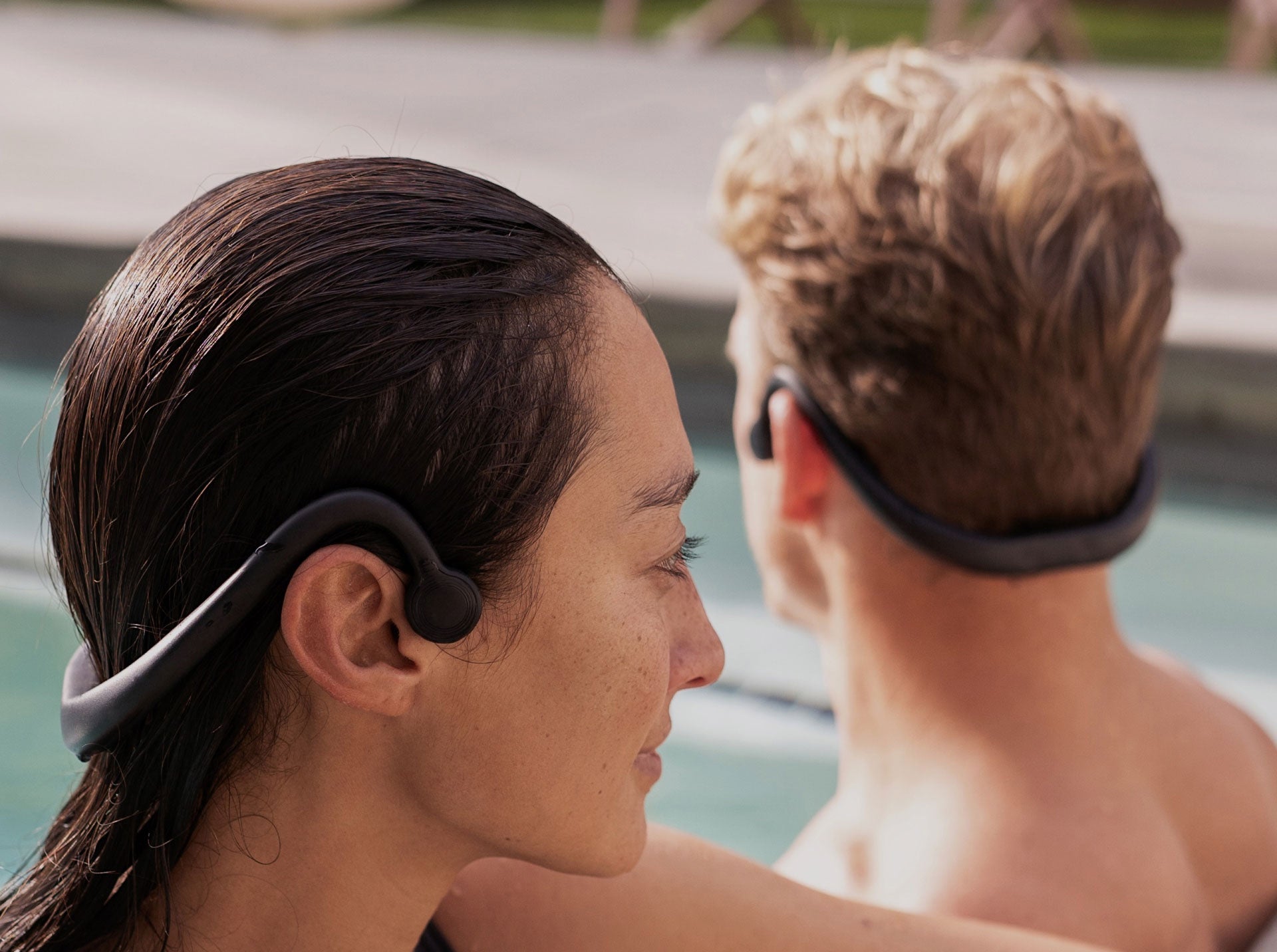
Wear Zygo headphones under your swim cap because of their low-profile and bone-conduction build. They’re engineered to stay snug, deliver clear audio, and are distraction-free.
Zygo Waterproof Headphones – Best for Streaming Spotify Directly
The Zygo waterproof headphones are the only swimming headset that allows true live Spotify streaming underwater. Instead of relying on Bluetooth, Zygo uses a custom radio-frequency transmitter that beams audio from your phone to your headset, even while submerged.
You can stream any app, Spotify, Apple Music, Audible, or Apple Podcasts, with crystal-clear audio and impressive range (up to 100 meters). Zygo also includes lap counting, guided training modes, and on-the-go charging, making it ideal for swimmers, triathletes, and fitness enthusiasts who want to stay motivated with real-time sound.
OpenSwim by Shokz – Best for Offline Playback
Shokz OpenSwim (formerly AfterShokz Xtrainerz) is a strong choice for swimmers who prefer pre-downloaded playlists. It doesn’t stream apps like Spotify directly, but it can store MP3 or WAV files transferred from your computer. With bone conduction technology and an IP68 rating, it’s great for swimmers who don’t mind syncing their music ahead of time. Just remember that you have to convert Spotify songs to MP3s, then manually transfer them to this device's storage to listen to your favorite songs offline.
FINIS Duo – Best Budget Option for Audiobooks and Podcasts
The FINIS Duo is a budget-friendly bone conduction headset built for MP3 playback only; it doesn’t support Spotify or any type of wireless streaming. Instead, you’ll upload audio files directly from your computer before your swim.
It attaches securely to your goggles and delivers clear, vibration-based sound underwater, making it ideal for audiobooks and podcasts rather than live music streaming. While it lacks app compatibility, its affordability, comfort, and simple setup make it a solid choice for casual swimmers who prefer offline listening.
Final Thoughts: The Best Headphones for Spotify While Swimming
When it comes to swimming headphones for Spotify and streaming, each of these models has its strengths. The FINIS Duo and OpenSwim by Shokz are dependable options for swimmers who don’t mind downloading and transferring music files ahead of time. They’re practical for offline playback but limited when it comes to real-time audio or app-based content.
For those who want a seamless experience, true Spotify streaming, live podcasts, and audiobooks underwater, Zygo stands apart. Its custom transmitter and app integration let you enjoy your favorite audio without extra steps or downloads. In short, if your goal is to bring your playlists and motivation into the pool with zero hassle, Zygo offers the most advanced and convenient way to do it.
How to Set Up Spotify for Swimming
Once you’ve chosen the right swimming headphones with Spotify, getting set up is simple. Follow these steps to make sure your playlists, podcasts, and audiobooks play smoothly, whether you’re poolside or fully submerged.
Step 1: Choose the Right Headphones
If you want to stream Spotify directly, choose a headset like Zygo, which uses a transmitter to deliver real-time audio underwater. If you prefer offline playback, use waterproof MP3 headphones that let you transfer downloaded files from your computer.
Step 2: Prepare Your Spotify Account
If you’re using Zygo waterproof headphones, you can stream Spotify directly from your phone, whether you have a Free or Premium account. The Zygo transmitter sends the audio underwater in real time, so no downloads are needed.
If you’re using other waterproof headphones that rely on offline playback, you’ll need a Spotify Premium subscription to download songs or podcasts ahead of time. Free accounts require an internet connection, which doesn’t work underwater.
Step 3: Download or Stream Your Content
-
Zygo Users: Stream Spotify, Apple Music, Audible, or any audio app directly from your phone via the Zygo transmitter. No downloading needed.
-
Offline Playback Headphones: Use Spotify’s “Download” feature to save your playlists or podcasts to your device before you swim.
Step 4: Set Up Your Gear Poolside
Place your phone and transmitter on a dry surface, such as a towel, chair, or table, near the pool. Keep them within range of your swim lane for uninterrupted sound quality.
Step 5: Secure Your Headset and Start Swimming
Fit your bone conduction headset under or over your swim cap and ensure the contact points rest comfortably on your cheekbones. Press play, and your music or podcast will follow you underwater, lap after lap.
Ready to Bring Your Spotify Playlist Underwater? Try Zygo
For years, swimmers had to settle for silence, outdated MP3 players, or complicated workarounds just to listen to music in the pool. Today, that’s no longer the case. Zygo makes underwater audio simple, seamless, and genuinely enjoyable by solving one of the biggest challenges in swimming: Bluetooth doesn’t work underwater, but your motivation still matters.
With Zygo, you can stream Spotify, Audible, Apple Podcasts, or any app you love — live — while you swim. No conversions. No manual downloads. No juggling files. Just real-time audio that keeps you focused, consistent, and excited to get back in the water.
Whether you're following a swimming training program for weight loss, building endurance for a triathlon, or just trying to make your pool sessions more fun, Zygo gives you the freedom to bring your music, coaching, and motivation with you underwater.
If you want fewer barriers, more consistency, and better workouts, Zygo is the easiest way to transform your time in the pool. Dive in and experience what underwater audio should feel like.